The situation is common: weeks of work — invoices, customer records, project files — lost because an external drive and a laptop failed at the same time. Both were in the same bag. One copy. Not a backup.
This distinction sounds technical. It is not. It is one of the most practical things any business owner needs to understand about their technology — and most of them are never told.
What makes something a backup
Storage means you have the data somewhere. Backup means you can recover the data after something goes wrong — and that "something" can be a hardware failure, a ransomware attack, an accidental deletion, a fire, or a flood. A good backup survives scenarios that your main storage does not.
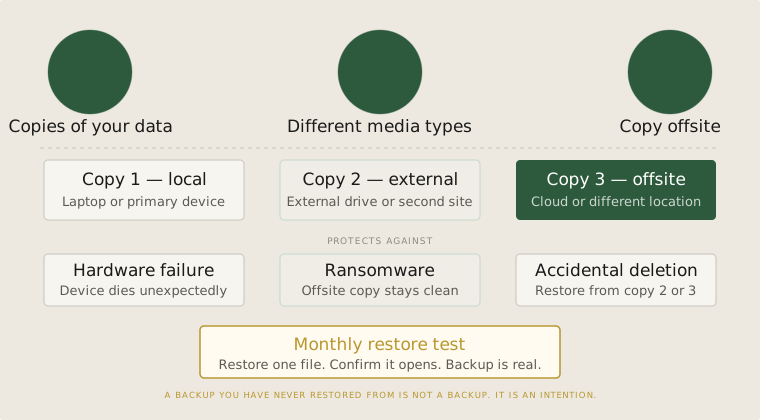
The rule that professionals use is called 3-2-1: three copies of your data, on two different types of media, with one copy kept offsite. Your working files on your laptop are copy one. An external drive at your office is copy two. A cloud backup or a drive at your home is the offsite copy. All three can fail — but the chances of all three failing at once, in the same event, are very low.
Most small businesses operate with one copy, sometimes two. They are one bad event away from losing everything.
The tests nobody runs
Having a backup is necessary. But it is not sufficient. A backup you cannot restore from is not a backup — it is a false sense of security.
Backup software fails silently more often than people realise. Drives develop errors that only show up when you try to read from them under pressure. Cloud services change their pricing, their retention policies, or their interface in ways that make retrieval harder than expected. The only way to know your backup works is to test it — by actually restoring files from it, not by checking that the software says it completed successfully.
A simple discipline: once a month, restore one file from your backup to a different location and confirm it opens correctly. It takes five minutes. It tells you immediately whether your backup is real or just a process that appears to be running.
What businesses actually need
For a small business with a handful of computers, a practical backup setup is not expensive or complicated. A cloud backup service running automatically in the background on each machine covers most failures. An external drive kept at a separate location covers the rest. The total cost is usually less than a single day of lost productivity.
The question to ask is not "do we have a backup?" but "if our main computer was stolen tonight, how much work would we lose, and how long would it take to be fully operational again?" The answer to that question tells you exactly how much your current backup is actually protecting.
For businesses with shared files — a server, a NAS, a shared folder — the same logic applies but the stakes are higher. More people depending on the same data means a failure affects everyone at once. A proper backup strategy for shared storage requires the same 3-2-1 thinking, applied at the shared system level, not just at each individual machine.
What backup actually requires
Backup is not a technology purchase. It is a discipline. You can buy all the right tools and still have no real protection if nobody tests the restore process, checks that backups are completing, or thinks about what "offsite" actually means in practice.
The businesses that recover quickly are not the ones with the most sophisticated backup setup. They are the ones that treated their backup as something to be verified, not just configured.
Before you configure anything
- A copy and a backup are not the same thing. A backup must be able to survive the failure of your primary system — including physical loss, ransomware, and accidental deletion.
- Apply the 3-2-1 rule: three copies, two media types, one offsite. Most small businesses are missing at least one of these.
- Test your restore process monthly. A backup you have never tested is a backup you cannot trust when you need it most.