A recurring pattern in small business IT: an IT provider costs a modest monthly fee and appears good value — until you account for the staff time lost waiting for problems to be fixed, two or three times a month. At any reasonable estimate of staff time, the actual cost is considerably higher — and rising every time a problem is fixed in a way that makes the next problem more likely.
The monthly invoice is the smallest part of what IT support actually costs.
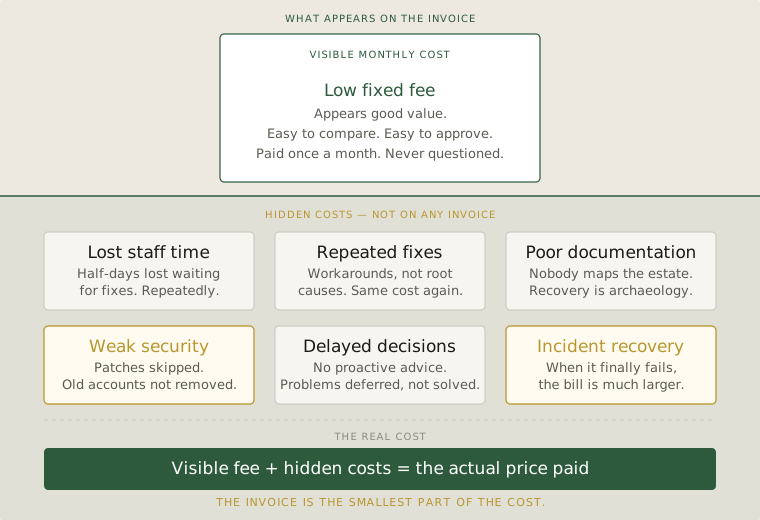
What cheap IT support actually delivers
An IT vendor competing primarily on price is almost always making trade-offs that are invisible to the buyer until something goes wrong. They are using older tools, spending less time on each environment, skipping documentation, and deferring anything that does not look like an emergency. The work gets done — eventually — but it gets done in a way that accumulates problems rather than resolves them.
The clearest signal is recurring issues. If your Wi-Fi drops in the same area every month, if a particular computer is always slow after updates, if the same user keeps having email problems — these are not bad luck. They are deferred decisions that a vendor optimising for speed over quality consistently avoids making.
Another signal is documentation. Does your IT vendor know the passwords to your router, your firewall, your cloud accounts? Do you? A vendor who holds all of that knowledge informally, in their head, has created a dependency that gives them leverage and costs you continuity if they leave or become unavailable.
The decisions that cost the most
The highest-cost mistakes made by under-resourced IT vendors are not the visible failures. They are the invisible ones — the configurations that work just well enough that nobody questions them, but that are one event away from causing serious damage.
No firewall rules reviewed in two years. Backups configured but never tested. Staff accounts for people who left the company still active. Software running on outdated versions because updates were skipped to avoid disruption. None of these look like problems until they become crises — and crises in a small business are disproportionately expensive in time, recovery cost, and lost trust.
A competent IT vendor finds these things before they become crises. That is most of what good IT support actually is: systematic, proactive attention to the things that are quietly accumulating risk.
What to look for instead
When evaluating IT support, the right questions are not about price. They are about process. Do they provide a written record of what they have done and why? Do they give you a basic IT health review at least twice a year? Do they have a clear policy on how your credentials and system documentation are stored and shared with you?
A vendor who cannot answer these questions confidently is not running a professional operation, regardless of their monthly rate. The cost of finding that out during a crisis is much higher than the cost of asking these questions before you sign anything.
The right vendor is the one whose approach means the systems just work — the problems that do arise get fixed properly, and you are not building a dependency on someone whose departure would leave you locked out of your own systems.
What the invoice doesn't show
IT support is infrastructure. What you save on it in the short term, you pay for later — and the later payment usually arrives at a worse moment. The question is not whether a cheaper vendor saves you money — it is whether the money you save is worth the risk you are accepting in exchange for it.
Most of the time, it is not. And the business owners who discover this do so at exactly the moment when they can least afford to.
Questions worth asking
- Calculate the real cost of IT downtime — staff hours lost, not just the vendor invoice. The gap is usually significant.
- Recurring problems are a signal, not bad luck. They mean your current support is fixing symptoms rather than causes.
- Ask every IT vendor three questions: How do you document what you do? How do I access my own credentials if you are unavailable? When did you last review our security configuration?