A branch office with twelve staff, a forty-eight port switch, a server nobody can explain, and a UPS taking up floor space is not an unusual sight. That is not a branch office. It is a miniature data centre, built because someone twenty years ago believed every site needed its own infrastructure. Nobody has taken it apart since.
A modern branch office is much smaller than that, and much more capable.
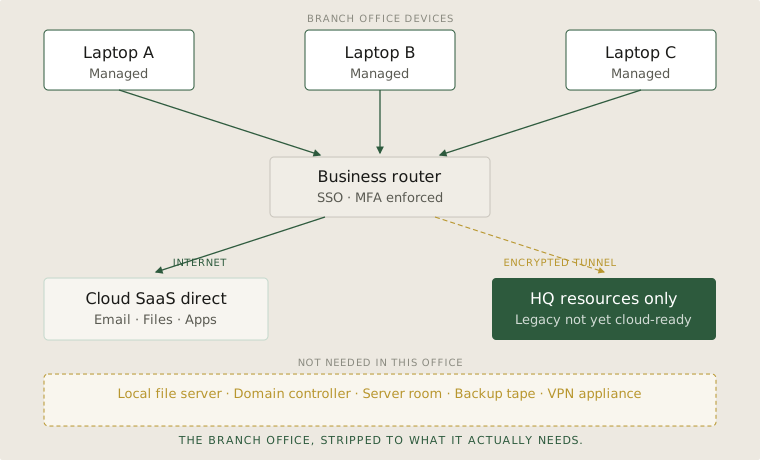
Three things on site. That is it.
Business-grade internet with a failover line. A small managed router. Laptops that are encrypted, enrolled, and authenticate to your identity provider. That is the whole on-site footprint of a well-designed branch.
Notice what is not on that list. There is no file server. There is no domain controller. There is no on-site Exchange. There is no backup tape rotation. There is no air conditioning bill for a closet full of equipment that runs hot. The work happens on the laptops. The data lives in SaaS. The identity lives in the cloud. The branch office is just a place where people sit.
Internet goes directly to SaaS
Email, files, the apps people use every day — those tools sit in cloud SaaS. They are not in HQ. There is no reason to backhaul a branch user's traffic to the head office just so it can leave again from there. That pattern made sense when the file server was in HQ. It does not make sense when the file server is Microsoft's or Google's.
So the calm path is: laptop, router, internet, SaaS. Direct. Fast. Local. The branch user's experience is the same as the HQ user's experience, because they are using the same cloud services over the same kind of internet connection.
The tunnel home is for what HQ still owns
Most organisations still have a small number of resources that genuinely live at HQ. A legacy ERP. A printing system. A line-of-business app that has not been moved yet. For those — and only those — there is an encrypted tunnel from the branch router back to HQ.
The discipline is to keep that tunnel narrow. List the things that need it. Anything that is not on the list goes through the internet path. If something is on the list that does not need to be, move it to SaaS and take it off the list. The tunnel should shrink over time, not grow. A branch office where the tunnel keeps growing is a branch office where the cloud migration was abandoned halfway.
The rule this pattern follows
A branch office is a place where people work. It is not a place where infrastructure lives. The moment you start treating a branch like a small data centre, you have signed up for everything that goes with running a data centre — patching, monitoring, hardware refresh, on-site visits when something fails — multiplied by the number of branches you have.
The cloud branch office pattern is not new. It is just the application of one rule consistently: if it does not have to be here, it should not be here.
What belongs on site
- The branch office holds people and connectivity. Nothing else. If there is a server in the cupboard, ask what it actually does — and whether anything would break if you turned it off.
- Daily work goes directly to SaaS over the internet, not through HQ. Backhauling branch traffic to headquarters made sense when the file server lived there. It does not make sense any more.
- The tunnel to HQ is for legacy resources only, and the list of those should be getting shorter every year. A tunnel that keeps growing is a migration that has stalled.