Most small offices I see are paying for infrastructure designed for organisations five times their size. A managed switch with capacity nobody uses. A backup appliance for files that already live in the cloud. A support contract for hardware that exists only because someone bought it a decade ago and nobody has decommissioned it.
It is not their fault. The IT industry is well-practised at selling complexity. A small business owner who asks for help often ends up with a quote that looks comprehensive and serious, and that they cannot actually evaluate. So they sign it.
The honest answer is much smaller. Five things.
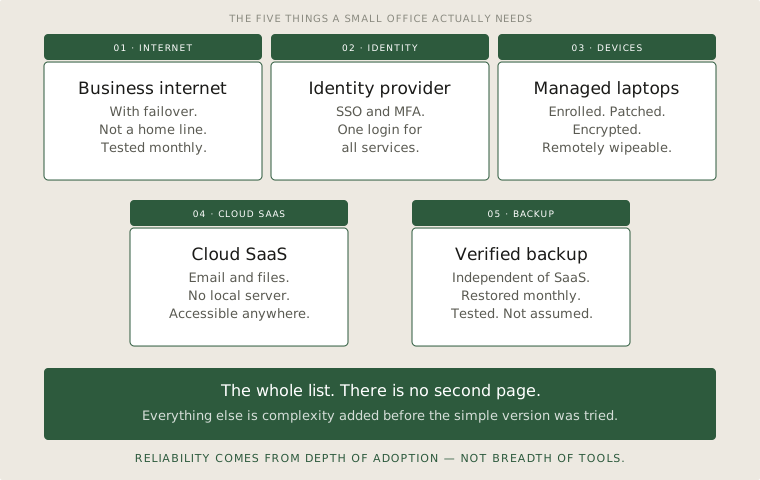
Business internet
Primary line plus a failover. A consumer connection with a single supplier is not enough for a business that loses money when it is offline. The failover does not have to be fast — it has to be different. Different supplier, different physical route, different technology if possible.
Get an SLA on paper. Most small businesses do not, then act surprised when the provider takes three days to respond to an outage.
Identity provider
This is where the real investment goes. Single sign-on with multi-factor authentication, mandatory for everyone. Every app that staff use authenticates through it. When someone joins, you create one account. When someone leaves, you disable one account. The rest follows.
Twelve separate logins per person, none of them connected, and a spreadsheet of who has access to what that has not been updated in six months — this is a common setup in small offices. It is not a security posture. It is a setup waiting for a small mistake to become a bigger problem.
Managed laptops
Encrypted at rest. Enrolled in a management system. Capable of being remotely wiped if lost or stolen. That is the floor. The laptops themselves can be unremarkable — they are running cloud apps, not heavy local software.
"Managed" does not mean expensive. It means a system that can tell you what laptops exist, who has them, and whether they are up to date. Most small offices cannot answer those three questions, which is the actual problem.
Cloud SaaS
Email, files, productivity apps, line-of-business tools. All of it. There is no good reason for a small office to run any of this on-site in 2026. The cost, the maintenance, the patching, the backup overhead — it is all higher than the SaaS bill, even when it does not look like it on the spreadsheet.
Pick one ecosystem and stay in it. Microsoft or Google. Mixing the two on the email side, in particular, costs more than it saves.
Verified backup
SaaS providers are responsible for keeping their service running. They are not responsible for protecting you from your own mistakes — the deleted file, the rogue admin, the ransomware that encrypted everything through a connected application. You need a backup that lives outside the SaaS provider, that runs automatically, and that you have actually tested.
Tested, not just configured. A backup you have never restored from is not a backup. It is a configuration file with optimistic intent.
What is not on the list
No server room. No file server. No on-site domain controller. No Exchange. No tape rotation. No spare hardware shelf. No after-hours patching window because there is nothing in the building that needs patching out of hours.
If any of those are in the current setup, the question is not how to maintain them better. The question is how to remove them.
The honest list
If a small office can run without something, it should. Every box on the diagram is something that needs maintenance, costs money, and adds a failure mode. The goal is not to have less technology. The goal is to have less to look after, so the technology you do have actually works.
The honest checklist
- The whole stack for a small office fits in five items. If the proposal in front of you has more, ask which items can be removed.
- Identity is the most important investment. Most other simplifications follow from getting it right.
- A backup is only real if it has been restored from. Schedule the restore test, do not assume it works.