Most small businesses run on what is politely called "break-fix" IT support. Something stops working. Someone calls the IT person. The IT person comes and fixes it. The business carries on. This feels efficient — you only pay when something goes wrong.
The problem is that by the time something has gone wrong, you have already paid. In lost time, in disruption, and in the kind of pressure that leads to rushed decisions that create the next problem.
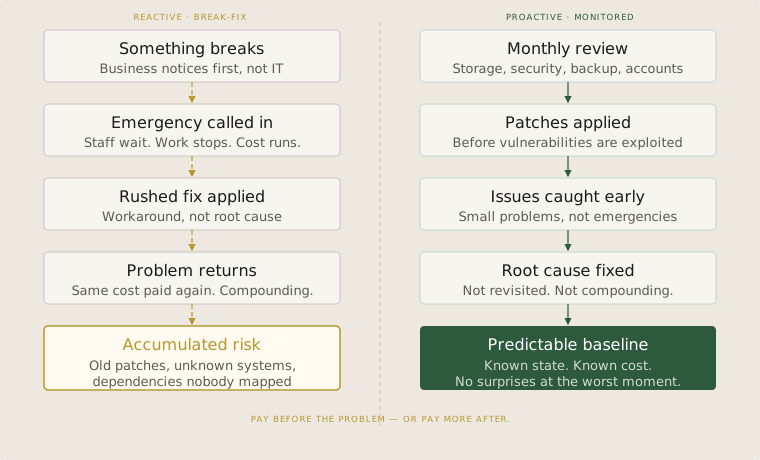
The real cost of waiting
When a server goes down during business hours, the direct cost is easy to see — staff cannot work, customers cannot be served, transactions stop. But the indirect cost is harder to quantify and usually larger. The decisions made under pressure to restore service quickly. The workarounds people adopt and never abandon. The trust that erodes when the same type of failure happens twice.
Reactive IT creates a specific kind of organisational behaviour: people stop relying on systems that have failed them before. They keep local copies of files that should be shared. They use personal email when the business email is unreliable. They build around the system rather than with it. These workarounds become invisible infrastructure — carrying real risk that nobody is managing.
What proactive support actually looks like
Proactive IT support is not a luxury for large businesses. It is simply the difference between managing your systems and being managed by them. In practice, it means a small number of regular activities that cost very little time but prevent a disproportionate amount of disruption.
Monitoring: knowing that a drive is at 90% capacity before it fills up. Knowing that a computer has not received a security update in three months. Knowing that the backup completed last night. None of these require expensive tools — they require someone to check, on a schedule, before a problem develops.
Patching: keeping operating systems and software current is the single most effective thing a small business can do to reduce security risk. Reactive vendors skip this because updates occasionally cause disruption. Proactive vendors manage updates carefully so they do not cause disruption — and the security benefit is substantial.
The conversation to have with your IT vendor
If your current IT support is purely reactive, the question to ask is: what are you monitoring on our systems right now? A vendor who cannot give a clear answer is not watching anything. They will find out something is wrong when you do — after it has already affected your business.
A good IT vendor for a small business does not need a large team or expensive software. They need a checklist and the discipline to follow it. Monthly reviews of storage, security, backups, and user accounts. Quarterly checks on software versions and access controls. Annual reviews of the overall setup to ask whether anything has changed — new staff, new services, new risks — that should change how the systems are configured.
None of this is complicated. The difference between IT support that protects a business and IT support that merely responds to it is consistency — someone checking the same things, on a schedule, before they become problems.
The cost you defer, not avoid
There is a choice in how IT support works: pay before problems happen, or pay after. Before is cheaper, less disruptive, and does not compound. After is more expensive, more stressful, and tends to produce the same problem again in a different form.
Reactive IT is not cheap support. It is deferred maintenance — and like all deferred maintenance, the bill eventually arrives at a moment when you cannot afford to pay it.
A practical check
- Break-fix IT transfers risk onto your business. The vendor pays nothing when your systems fail — you do.
- Ask your IT vendor what they monitor and on what schedule. If the answer is vague, nothing is being actively managed.
- Proactive IT is not expensive. It is a checklist, followed consistently. That discipline is worth more than any individual fix.